
Easy to read KJV Bible
Bible VerseLibraries & Demo
4.8568.00 Reviews
- Version
- Easy to read kjv bible audio offline 17.0
- Installs
- 50.00K
- Age Rating
- Everyone
Screenshots







Our Review of Easy to read KJV Bible
 Analysis by Appyee
I reach for a Bible app most often when I want to read a passage without turning the moment into a project. Easy to read KJV Bible is aimed at that kind of use: it centers on the King James Version and gives readers a digital place to browse, search, and listen. I find the appeal less about replacing a printed Bible than about having a familiar text close at hand when I have a few minutes to spare.
What the app offers in everyday use
The app comes from Bible Verse and sits in the libraries and reference-app space rather than trying to be a broad religious social platform. It is free to install, with optional in-app purchases listed at $0.99 per item. Its current version is Easy to read kjv bible audio offline 17.0, and the app is rated for Everyone. It has a 4.8 average from around 2.4 thousand ratings, with more than 50 thousand installs. Those figures suggest a substantial audience, though they do not tell me whether its particular reading style will suit you.
For a new user, the central decision is simple: do you want the KJV, and do you value having audio alongside text? If you prefer a different translation or need an app built around extensive study notes, this may not be the best fit. If the King James wording is already familiar—or you specifically want to read it—then a focused reader can feel less distracting than a general-purpose app loaded with commentary, reading plans, and community features.
Reading without turning it into a task
Ever found yourself wanting a Bible app that’s both easy to navigate and packed with features? Well, I’ve got something interesting for you. I recently downloaded the Easy to read KJV Bible app, and let me tell you, it's like having a pocket-sized spiritual companion. If you’re looking for a straightforward yet comprehensive Bible app, this might just be your next download.
The store’s brief description points to understanding God’s Word, but the practical value depends on how you use the text. I would treat the app as a convenient reading and listening companion, not as a substitute for a trusted study resource when a passage needs deeper historical or theological context. A verse can be easy to locate while still being difficult to interpret, especially in older English.
First Impressions: Interface & Usability
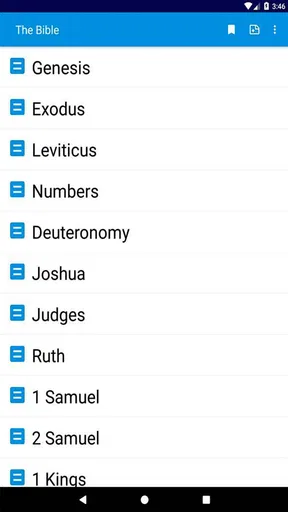
Right off the bat, the interface of the Easy to read KJV Bible is a breath of fresh air. It’s designed to be intuitive, so you won’t find yourself lost in a sea of options. The clean layout makes it easy to navigate through the Old and New Testaments. Whether you’re a tech-savvy millennial or someone who’s just venturing into the digital world, you’ll find this app user-friendly.
One of the things I love about it is the ability to switch between day and night modes. It’s a small feature, but it makes a huge difference when you’re reading late at night. The text is clear and legible, and I didn’t have to squint or adjust my screen brightness constantly.
That said, an uncluttered screen is only helpful if it matches your reading habits. I like to decide what I am looking for before opening a passage: a particular verse, a chapter I have been meaning to read, or a section I want to hear. That small choice makes the app feel more useful than aimlessly browsing, especially when I only have a short break.
Finding and returning to passages
Aside from its simplicity, the app packs some neat features. The search function is particularly handy. You can easily find specific verses or keywords, which is super useful if you’re preparing for a Bible study or just need some quick inspiration.
For a more reliable search, I suggest trying a distinctive word or a short phrase rather than a long sentence from memory. Older wording can differ from the phrase someone remembers, and a broad search may return more possibilities than expected. Once I find a passage, I can read the surrounding verses instead of treating the search result as a complete answer; context often changes how a single line lands.
Another feature worth mentioning is the bookmarking option. I can’t count how many times I’ve read something profound and wanted to return to it later. With this app, you can bookmark your favorite verses, making it easy to revisit them whenever you need a spiritual boost.
Bookmarks are most helpful when I give them a purpose. I might save a verse I want to revisit during a quiet moment, or keep a passage handy for a conversation or study group. If I save every line that catches my attention, the list becomes less useful, so I prefer to treat bookmarks as a small reading trail rather than a complete archive.
"The app doesn’t just stop at reading; it enhances your overall experience."
I also appreciated the daily verse notifications. It’s like getting a dose of inspiration right when you need it. Plus, the app allows you to share verses directly to social media or messaging apps, making it seamless to spread some positivity around.
Notifications can be a gentle prompt, but they work best when they fit your day instead of interrupting it. I would keep them only if I genuinely welcome a verse alert; otherwise, opening the app intentionally may feel calmer. Sharing is similarly useful when a passage is relevant to a specific person, though I would add a sentence of context rather than sending a verse without explanation.
Listening, display choices, and practical trade-offs
One aspect where this app shines is personalization. You can adjust the font size and style to suit your reading comfort. I found this particularly helpful since I’m picky about text appearance. The app lets you tailor the reading experience to fit your needs, making long reading sessions more enjoyable.
Additionally, audio features are available, which is perfect for those who prefer listening over reading. Whether you’re on a long drive or winding down before bed, you can listen to your favorite passages without hassle.
The version name highlights audio and offline use, which points to the app’s emphasis on listening and access without a live connection. In practice, I would prepare before relying on any offline reading or listening: open the material while connected and check that the passage or audio you need is available. This is a useful habit for a commute or a place with weak reception, and it avoids assuming that every part of an app is automatically ready offline.
Audio can also change how I approach a passage. Listening is convenient while doing a quiet household task, but it is less suited to careful comparison of wording or stopping to examine a phrase. For study, I would keep the text visible and pause often; for a routine listen, audio is the more relaxed option. Neither mode has to replace the other.
Adjusting the text before settling in is another worthwhile step. A larger type size can reduce eye strain, but it may also mean more scrolling, so I would choose comfort over trying to fit a whole chapter on screen. Night mode is useful in dim surroundings, though it is not a reason to read while driving or to ignore ordinary screen breaks.
How it fits beside other Bible apps
So, what makes this app stand out from the rest? It’s the little things combined that create a big impact. The seamless integration of features, the ease of use, and the thoughtful design all contribute to a superior user experience. It’s as if the developers really took the time to understand what users want in a Bible app.
Compared with a printed KJV Bible, a phone app is easier to carry and search, and it can offer audio in the same place as the text. A paper copy, on the other hand, is not dependent on a charged device and can be more comfortable for people who want fewer screen distractions. Compared with larger Bible platforms, this app’s focused KJV identity may be a plus for readers who do not need a library of translations or extensive study tools. Those looking for side-by-side translations, scholarly notes, or a structured course should choose an option designed around those needs instead.
Moreover, it’s not just about reading; it’s about engaging with the scripture in meaningful ways. Whether you’re a devout Christian or someone exploring spiritual texts, this app provides a platform that respects your journey.
A realistic use for me would be a short morning pause: I open a passage before the day gets busy, read a few verses, and save one that I want to return to. On another day, I might listen while making breakfast, then use search later to find the passage again. This is where the mix of text, audio, search, and bookmarks earns its place: each tool supports a different moment, rather than demanding a long session.
Who will get the most from it
I would recommend it most to readers who want a convenient KJV on their phone, appreciate adjustable text, and are likely to use either search or audio. It can also suit someone returning to regular reading who wants a low-effort way to begin with a short passage. The free entry point makes it easy to try, while optional purchases mean it is sensible to check the purchase screen before choosing anything beyond the basic experience.
I would skip it if the King James Version is not the translation you want, if you need robust academic study aids, or if you are trying to avoid phone use during devotional time. Readers who rely on a particular translation for church or group study should confirm that the wording matches their shared material before making this their main reference. And if you mainly want a printed reading experience, a physical Bible may serve you better.
One question readers often have is whether audio makes the app useful when they cannot look at the screen. It does give listening another role, but I would use it only in situations where listening is safe and does not compete with attention—never as something to operate while driving. Another practical question is how to keep a verse easy to find later: search is useful for locating it, while bookmarking is better when you know you will return to it. For a passage you are studying closely, saving it and reading the surrounding chapter is more dependable than relying on a remembered fragment.
What to keep in mind over time
The current version, Easy to read kjv bible audio offline 17.0, indicates a product that has moved beyond a bare text reader in name and scope. The app was released on October 24, 2017, and its present version reflects an established offering rather than a brand-new experiment. That history may reassure someone looking for a familiar, focused tool, but version numbers alone do not tell me how often a particular feature changes or whether every device behaves the same way.
For existing users, the strongest reason to keep it installed is a routine built around the KJV: saved passages, occasional searches, and audio when reading is inconvenient. If those habits are not part of your day, the app may end up duplicating a Bible you already use. I would periodically review notification settings and saved verses so that the app remains a helpful companion rather than another source of clutter.
The main gap for some readers is not a flaw so much as a matter of fit. KJV language can be beautiful and familiar, but its phrasing may slow down a newcomer who wants contemporary wording. Audio can make a passage easier to access, yet listening alone is not always ideal for close study. If those trade-offs matter to you, compare it with a translation-first reader or a study-focused Bible app before settling on one.
A considered recommendation
All in all, the Easy to read KJV Bible app is a fantastic tool for anyone looking to deepen their understanding of the Bible. It’s a well-rounded app that manages to combine simplicity with functionality, offering users a delightful reading experience. If you haven’t tried it yet, I’d say give it a shot. You might just find it becomes an essential part of your daily routine.
Ready to dive into the scriptures with ease and simplicity? You can download the app from your preferred app store and embark on a spiritual journey like no other.
Verdict
Strengths of Easy to read KJV Bible
- Simple and intuitive user interface.
- Offline access for reading anywhere.
- Quick search feature for easy navigation.
- Customizable font sizes for readability.
- Bookmark and highlight options.
Limitations of Easy to read KJV Bible
- Limited translation options available.
- No audio version for listening.
- Ads present in the free version.
- No cross-referencing with other texts.
- Lacks community or discussion features.
Similar Picks in This Category
View All
PGT: GFX, Launcher & Optimizer
Trilokia Inc.4.5

AusweisApp Bund
Governikus Service GmbH3.7

Cardboard
Google LLC3.2

Gamers GLTool with Game Tuner
Trilokia Inc.4.5

Multi Web Chat - Read Secretly
World Scan & Cleaner3.8

App Cloner Premium & Add-ons
App Listo1.9
Frequently Asked Questions
What features does the Easy to Read KJV Bible app offer?
The Easy to Read KJV Bible app provides a user-friendly interface with features such as offline reading, daily devotionals, verse highlighting, and bookmarking. It also includes an audio version for listening on the go, a night mode for easier reading in low light, and customizable font sizes for better readability.
Is the Easy to Read KJV Bible app available for free?
Yes, the app is available for free download on both Android and iOS platforms. However, it may offer in-app purchases or ads to enhance the user experience, such as removing ads or accessing premium content like additional devotionals or study guides.
Does the app require an internet connection?
The Easy to Read KJV Bible app can be used offline for reading and accessing saved content, such as highlighted verses and bookmarks. However, an internet connection is needed for downloading updates, additional resources, or for accessing online features like daily devotionals and audio streaming.
Can I customize the appearance of the text in the app?
Absolutely! The app allows users to customize the text appearance to suit individual preferences. You can adjust the font size, choose from different font styles, and switch to night mode for comfortable reading in darker environments. These options ensure a personalized and enjoyable reading experience.
Is the audio feature available for all Bible chapters?
Yes, the audio feature covers all chapters of the King James Version Bible within the app. Users can listen to any chapter at their convenience, making it ideal for those who prefer auditory learning or want to engage with the Bible while multitasking. An internet connection may be required for streaming.
